class Parent extends React.Component {
   callChildFunction = () => {
       this.child.handleActionParent();  ///calling a child function here
  }
   render(){
      return (
           <div>
           {/* other things */}
           <Child ref={(cd) => this.child = cd}/>
           </div>
      )
    }
}

class Child extends React.Component {
   handleActionParent = () => {
       console.log('called from parent')
   }
   render() {
      return (
           {/*...*/}
      )
   }
}2018年10月1日 星期一
React refs example

2018年9月28日 星期五
[JavaScript] Convert Byte to other size, Byte轉換
  bytesConvertToSize = (bytes) => {
    let sizes = ['Bytes', 'KB', 'MB', 'GB', 'TB'];
    if (bytes === 0)
        return '0 Bytes';

    let i = Math.floor(Math.log(bytes) / Math.log(1024));
    return +(Math.round(bytes / Math.pow(1024, i) + "e+2") + "e-2") + ' ' + sizes[i];

    // 下行會有尾數為 0 的狀況,因此改另一方法
    // With problem 123.499 will be 123.50 KB,
    // return (bytes / Math.pow(1024, i)).toFixed(2) + ' ' + sizes[i];

  }
2018年1月23日 星期二

2017年12月7日 星期四
保哥教你如何讓 windows command 變好看 (How to have good looking Windows Command Prompt)
保哥教你如何讓 windows command 變好看


[保哥部落格連結]
https://blog.miniasp.com/post/2017/12/06/Microsoft-YaHei-Mono-Chinese-Font-for-Command-Prompt-and-WSL.aspx
https://blog.miniasp.com/post/2017/12/06/Microsoft-YaHei-Mono-Chinese-Font-for-Command-Prompt-and-WSL.aspx
[臉書連結,下面有討論]
https://www.facebook.com/will.fans/posts/1908557939173341
[保哥 Github]
https://github.com/doggy8088/MicrosoftYaHeiMono-CP950
直接下載
Win7 使用方法
1. 下載字型後安裝
2. 修改 HKEY_LOCAL_MACHINE\SOFTWARE\Wow6432Node\Microsoft\Windows NT\CurrentVersion\Console\TrueTypeFont
新增 REG_SZ, "950xxx" = "Microsoft YaHei Mono"
(xxx 為任意字元, 第一個 x 不能為數字)
ps. 我自己是用 950a11

3. 在 cmd 視窗上選擇預設值

4. 選擇 Microsoft YaHei Mono

就大功告成啦!十分感謝 Will 保哥的教學,在此膜拜他一下。
2017年11月6日 星期一
MircoSD Card General Recommendations 使用與保存方法
General Recommendations
1. There are counterfeit memory cards out there. Buying from a reputable retailer helps minimize the risk of getting a fake.
(市面上充斥許多偽卡,請向可靠的商家購買記憶卡以降低買到偽卡風險。)
2. Memory cards are complicated electronic products. A small percentage of electronic products end up being faulty from the manufacturing process. So it’s good practice to test your card before using it in a mission critical application. Better yet, have spare/s as backup.
(記憶卡為複雜的電子產品,有小部份的機率的產品會在製造過程損壞。因此建議在使用記憶卡前要先進行完整的測試;而更好的做法是勤勞地為它備份。)
3. Memory cards are not designed for long-term archival storage of photos and video. It’s good practice to download the data as soon as practical and get it backed up securely.
(記憶卡並非設計為長期備份的儲存載體,尤其是存儲照片和影片。較好的做法是在每次用完後儘快取出重要檔案並保持良好的備份習慣。)
4. Format the card in the camera rather than with your computer. It reduces the risk of formatting problems.
(請儘量使用相機或手機裝置進行格式化,而非先在電腦上進行,如此一來可降低格式化問題的風險。)
[1] Refs: Have Camera Will Travel: MicroSD Card Speed Tests
2017年6月20日 星期二
讓記事本預設是 UTF-8
相信會找到這篇文章來的朋友一定是有這方面的困擾,一般來說,微軟內建的記事本的預設編碼是 ANSI,然而當我們需要存成 UTF-8 時,還要特地另存新檔(Save as)才能轉換,萬一忘記會造成一些無法預期的錯誤,不如就直接將記事本設成 UTF-8 吧!
首先隨便新增一個文字檔,可看到原本的格式是 ANSI
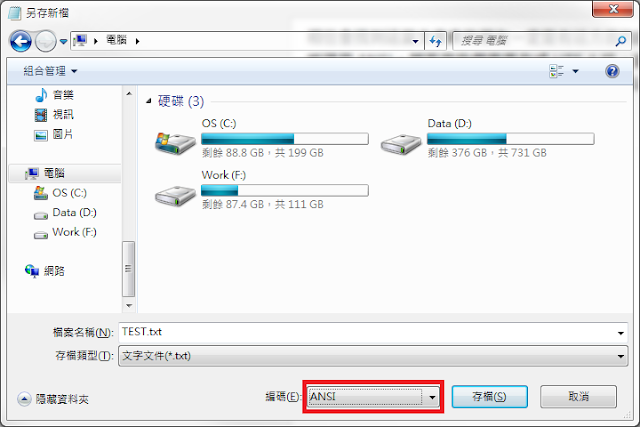


首先隨便新增一個文字檔,可看到原本的格式是 ANSI

我們在桌面上建一個檔案,將檔案命名為 TXTUTF-8.txt,並且不要輸入任何東西。在存檔時將檔案編碼選擇 UTF-8,接著將這個檔案放到 C:\WINDOWS\SHELLNEW 路徑下。

完成後打開 regedit ,移到 HKEY_CLASSES_ROOT\.txt\ShellNew 下,創建一個字串值並命名為 FileName,接著給予字串值為 TXTUTF-8.txt

將所有記事本關掉後,之後新增的純文字檔預設都變成 UTF-8 囉!
2017年3月24日 星期五
Google Play download pending. 下載卡住的問題
Sometimes we stuck in Google Play with a message "download pending".
Here's an easy to guide you how to solve it.
At first, going to [Setting] - [Apps], then find out "Google Play Store" and get in.
Tap [Storage], then clear data and clear cache might be success.
Good Luck.
Here's an easy to guide you how to solve it.
At first, going to [Setting] - [Apps], then find out "Google Play Store" and get in.
Tap [Storage], then clear data and clear cache might be success.
Good Luck.
2016年11月24日 星期四
Android Studio JAVA_HOME problem 問題
When compile a Android project in Android Studio encounter JAVA_HOME setting problem, you might modify this as following:
當使用 Android Studio 編譯時若遇到 JAVA_HOME 設定錯誤的問題,你可以試著以下操作:
Error message:
錯誤訊息會是像這樣:
Cannot find System Java Compiler. Ensure that you have installed a JDK (not just a JRE) and configured your JAVA_HOME system.
Step 1. [Other Settings] → [Default Project Structure]
一、 其它設定 → 專案預設結構

Step 2. Uncheck [Use embedded JDK] then redirect to your JDK path.
二、 取消勾選 [Use embedded JDK] 並且重新指定你的 JDK 位置

當使用 Android Studio 編譯時若遇到 JAVA_HOME 設定錯誤的問題,你可以試著以下操作:
Error message:
錯誤訊息會是像這樣:
Cannot find System Java Compiler. Ensure that you have installed a JDK (not just a JRE) and configured your JAVA_HOME system.
Step 1. [Other Settings] → [Default Project Structure]
一、 其它設定 → 專案預設結構

Step 2. Uncheck [Use embedded JDK] then redirect to your JDK path.
二、 取消勾選 [Use embedded JDK] 並且重新指定你的 JDK 位置

Ref from
參考以下
http://stackoverflow.com/questions/16913397/running-gradle-project-via-eclipse-errors-system-cannot-find-system-java-compil2016年8月16日 星期二
Can not open Android Studio? bad UseParallelGC
One day, I want to increase my Android Studio performance, I add some parameters in studio64.exe.vmoptions

So! what magic parameter make it wrong?
I google the message for that but all about JAVA_HOME environment issue.
Finally, I found that is ONE bad parameter on that:
Remove it and restart Android Studio, it work again!
-Xms2048m

-Xmx4096m

-XX:MaxPermSize=512m

-XX:ReservedCodeCacheSize=768m

-XX:+UseConcMarkSweepGC

-XX:SoftRefLRUPolicyMSPerMB=50

-XX:+UseParallelGC
Then, I can not open Android Studio again!
So! what magic parameter make it wrong?
I google the message for that but all about JAVA_HOME environment issue.
Finally, I found that is ONE bad parameter on that:
-XX:+UseParallelGC
Remove it and restart Android Studio, it work again!
2016年7月13日 星期三
在 Bash Terminal 中要使用 Proxy 連線
在任何 terminal 中(git-bash, cygwin-bash, bash),需要透過 proxy 連線時,卻出現:
之類的問題的話,代表 bash 環境裡的 proxy 未設定,透過下面的方法可在 bash 裡走 proxy 出去:
1. 編輯 bashrc 檔
2. 在文檔中加入
export htttp_proxy="http://<name>:<password>@<proxy_address>":"port"
例如:
cURL error 60: SSL certificate problem: unable to get local issuer certificate
之類的問題的話,代表 bash 環境裡的 proxy 未設定,透過下面的方法可在 bash 裡走 proxy 出去:
1. 編輯 bashrc 檔
matt@matt-pc ~ vi ~/.bashrc
2. 在文檔中加入
export htttp_proxy="http://<name>:<password>@<proxy_address>":"port"
例如:
export http_proxy="http://matt:1234@matt-proxy":"80"

export https_proxy="http://matt:1234@matt-proxy":"80"

export ftp_proxy="http://matt:1234@matt-proxy":"80"

export ssh_proxy="http://matt:1234@matt-proxy":"80"
訂閱:
文章 (Atom)