2016年8月16日 星期二

Can not open Android Studio? bad UseParallelGC

One day, I want to increase my Android Studio performance, I add some parameters in studio64.exe.vmoptions

-Xms2048m

-Xmx4096m

-XX:MaxPermSize=512m

-XX:ReservedCodeCacheSize=768m

-XX:+UseConcMarkSweepGC

-XX:SoftRefLRUPolicyMSPerMB=50

-XX:+UseParallelGC

Then, I can not open Android Studio again!


So! what magic parameter make it wrong?
I google the message for that but all about JAVA_HOME environment issue.

Finally, I found that is ONE bad parameter on that:

-XX:+UseParallelGC

Remove it and restart Android Studio, it work again!

2016年7月13日 星期三

在 Bash Terminal 中要使用 Proxy 連線

在任何 terminal 中(git-bash, cygwin-bash, bash),需要透過 proxy 連線時,卻出現:
cURL error 60: SSL certificate problem: unable to get local issuer certificate


之類的問題的話,代表 bash 環境裡的 proxy 未設定,透過下面的方法可在 bash 裡走 proxy 出去:

1. 編輯 bashrc 檔
matt@matt-pc ~ vi ~/.bashrc

2. 在文檔中加入
export htttp_proxy="http://<name>:<password>@<proxy_address>":"port"

例如:
export http_proxy="http://matt:1234@matt-proxy":"80"

export https_proxy="http://matt:1234@matt-proxy":"80"

export ftp_proxy="http://matt:1234@matt-proxy":"80"

export ssh_proxy="http://matt:1234@matt-proxy":"80"

2016年6月21日 星期二

在 windows 下 ssh 遇到 diffie-hellman-group1-sha1 問題時

在 windows上裝 cygwin 或是 git-bash 後要 git clone 時發生下面的問題:

$ git clone ssh://123.45.67.89:29418/Code/MyApp.git
Cloning into 'MyApp'...
Unable to negotiate with 123.45.67.89: no matching key exchange method found.
Their offer: diffie-hellman-group1-sha1

fatal: Could not read from remote repository.
Please make sure you have the correct access rights and the repository exists. my_name@my_host

或是在連線時發生:
$ ssh -p 29418 123.45.67.89
Unable to negotiate with 123.45.67.89: no matching key exchange method found. 
Their offer: diffie-hellman-group1-sha1

首先要檢查是否有設定 ~/.ssh/config 這個檔案


檔案內容可能如下:
HOST 123.45.67.89
PORT 29418
USER my_name

但因為是 windows 上使用模擬的 console (cygwin or git-bash ...etc) ,或是 ssh 的版本有問題,出現上述的 error 時,建議在下方加入這行

HOST 123.45.67.89
PORT 29418
USER my_name
KexAlgorithms +diffie-hellman-group1-sha1


再次執行
$ ssh -p 29418 123.45.67.89
==========================================================
  ****    Welcome to Gerrit Code Review    ****

  Hi matt, you have successfully connected over SSH.

  Unfortunately, interactive shells are disabled.
  To clone a hosted Git repository, use:

  git clone ssh://my_name@123.45.67.89:29418/REPOSITORY_NAME.git

Connection to 123.45.67.89 closed.
==========================================================

這樣就代表你連成功了!


如果是使TortoiseGit + ssh 又不想打帳密,還可以參考這篇 PuTTYgen
http://floatfrog.blogspot.tw/2015/06/tortoisegitssh-keygitlab.html


2016年4月18日 星期一

一個不錯的網頁 介紹 Android / ADB / Commands


Android / ADB / Commands ::
http://imsardine.simplbug.com/note/android/adb/commands/commands.html#shell

寫的很不錯

2016年4月6日 星期三

What does notations mean in Android xml resource document? @android:type、@*、?、@+


這篇是我看過寫的最好的一篇
Android xml资源文件中@、@android:type、@*、?、@+含义和区别

http://www.programgo.com/article/3549141171/

================================================================

以下為引用的內文

1、@[<package_name>:][<resource_type>/]<resource_name>和 @+[<package_name>:][<resource_type>/]<resource_name>, @android:id
简单的概括就是:
@[<resource_type/],resource_name>表示引用本应用中类型为reource_type的叫resource_name的资源。
@[<package_name>:][<resource_type/],resource_name>表示引用packgage_name这个包中类型为reource_type的叫resource_name的资源。这里的包一般就是framework中的android。
@+[<resource_type/],resource_name>表示新增加到本应用中类型为reource_type的叫resource_name的资源,通过aapt会自动生成一个整型的ID和它对应。
@+[<package_name>:][<resource_type/],resource_name>表示新增加到package_name的包中类型为reource_type的叫resource_name的资源,通过aapt会自动生成一个整型的ID和它对应。

2015年9月23日 星期三

如何更新 D-Link 無線分享器 AP 的韌體 How to upgrade D'Link Wireless AP firmware

如何刷 D-Link 無線分享器的韌體? 不論是刷回原廠或是刷成蕃茄都適用。

1. 將 AP 電源關閉並拔掉電源線。
(Turn off WiFi AP, then unplug the power.)

2. 用筆尖按壓 Reset 鍵不放,插入電源線,等待電源燈持續閃爍。
(Use a sharp pen to press and hold the RESET button, then plug in power wired, until the power indicated light blinking.)

3. 先將電腦的區網 IP (LAN IP) 設為 192.168.0.2 ,然後插上 AP 的 LAN 端。
( Set the Intranet IP as 192.168.0.2, then plug the RJ45 network wired to LAN port.)


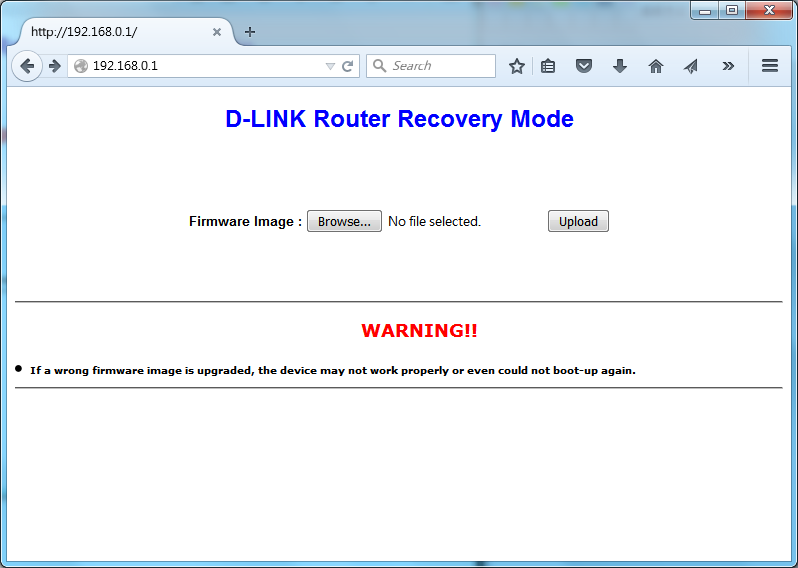
4. 這時候開啟瀏覽器,連至 AP 的 IP 192.168.0.1,此時就能看到 D-LINK 的畫面,選擇你要上傳的韌體。
(Now open your browser, connect to 192.168.0.1 that is your WiFi AP. You can see D-Link portal, to select the firmware you want to upload.)


5. 上傳後看到成功的畫面後重開機就成功囉!
(After uploaded, reboot the device will success.)

很~簡~單~吧
( So~ Ea~ Sy~)

2015年8月12日 星期三

Modify git alias (修改alias)


How do I alias commands in git?
http://stackoverflow.com/questions/2553786/how-do-i-alias-commands-in-git


我的 Git 偏好設定
https://ihower.tw/blog/archives/5436

lg = log --color --graph --pretty=format:'%Cred%h%Creset -%C(yellow)%d%Creset %s %Cgreen(%cr) %C(bold blue)<%an>%Creset' --abbrev-commit

[Ubuntu] 修改 bash ,讓 Terminal 不顯示主機名稱


總是覺得 Terminal 的畫面不夠寬嗎? 除了調整字體大小與視窗大小外,還可以透過修改 Bash 來節省空間。

以上圖為例,假使我不希望顯示長長的主機名稱,做法很簡單,只要修改 ~/.bashrc 來達成:

vi ~/.bashrc

找到變數 PS1 後,將 \h 刪除即可,記得重新開 terminal 或執行 bash 才生效。

其它可用的參數:

a : an ASCII bell character (07)
\d : the date in "Weekday Month Date" format (e.g., "Tue May 26")
\D{format} : the format is passed to strftime(3) and the result is inserted into the prompt string; an empty format results in a locale-specific time representation. The braces are required
\e : an ASCII escape character (033)
\h : the hostname up to the first '.'
\H : the hostname
\j : the number of jobs currently managed by the shell
\l : the basename of the shell’s terminal device name
\n : newline
\r : carriage return
\s : the name of the shell, the basename of $0 (the portion following the final slash)
\t : the current time in 24-hour HH:MM:SS format
\T : the current time in 12-hour HH:MM:SS format
\@ : the current time in 12-hour am/pm format
\A : the current time in 24-hour HH:MM format
\u : the username of the current user
\v : the version of bash (e.g., 2.00)
\V : the release of bash, version + patch level (e.g., 2.00.0)
\w : the current working directory, with $HOME abbreviated with a tilde
\W : the basename of the current working directory, with $HOME abbreviated with a tilde
\! : the history number of this command
\# : the command number of this command
\$ : if the effective UID is 0, a #, otherwise a $
\nnn : the character corresponding to the octal number nnn
\\ : a backslash
\[ : begin a sequence of non-printing characters, which could be used to embed a terminal control sequence into the prompt
\] : end a sequence of non-printing characters


參考來源
[1] How to: Change / Setup bash custom prompt (PS1) 
http://www.cyberciti.biz/tips/howto-linux-unix-bash-shell-setup-prompt.html


2015年7月28日 星期二

Ubuntu 開機時不想輸入密碼 How to Login Ubuntu Without Password

想要在開機時不輸入密碼,可以修改 /etc/lightdm/lightdm.conf 下的這行:
autologin-user=你的帳號
取消只要刪掉這行或用#注解或留空白即可


If you do not want to enter password when login ubuntu, edit /etc/lightdm/lightdm.conf
autologin-user=yourname
Cancel that just comment this line by # or remove it, or empty

2015年6月25日 星期四

[Android] Permission Denial when broadcasting Intent


When suffering the problem about Permission Denial, the LOG pattern might like this:
Permission Denial: broadcasting Intent { act=com.abc.intent.YOUR_INTENT flg=0x10 } from com.abc.myapp (pid=1191, uid=10119) requires com.abc.permission.APP_PERMISSION due to registered receiver BroadcastFilter{2463d6a8 u0 ReceiverList{d4f8ecb 695 com.android.systemui/10104/u0 remote:2fa2559a}}


It declaim the intent you broadcasting has no appropriate permission you used.

Now you can think about that any place has defined the permission before you used it?

You can check it by adb bugreport
adb bugreport > bugreport.txt


If you can find the following patterns in report you output, it means your device has granted the permission:
Permissions:
  Permission [com.abc.myapp.permission.WRITE_SETTINGS] (39f2d3cc):
    sourcePackage=com.abc.myapp
    uid=10124 gids=[] type=0 prot=signature|system
    packageSetting=PackageSetting{4b48615 com.abc.myapps/10124}
    perm=Permission{af5ad2a com.abc.permission.APP_PERMISSION}

If not, it means you don't have the permission cause you suffering Permission Denial.