Sometimes we stuck in Google Play with a message "download pending".
Here's an easy to guide you how to solve it.
At first, going to [Setting] - [Apps], then find out "Google Play Store" and get in.
Tap [Storage], then clear data and clear cache might be success.
Good Luck.
2017年3月24日 星期五

2016年11月24日 星期四
Android Studio JAVA_HOME problem 問題
When compile a Android project in Android Studio encounter JAVA_HOME setting problem, you might modify this as following:
當使用 Android Studio 編譯時若遇到 JAVA_HOME 設定錯誤的問題,你可以試著以下操作:
Error message:
錯誤訊息會是像這樣:
Cannot find System Java Compiler. Ensure that you have installed a JDK (not just a JRE) and configured your JAVA_HOME system.
Step 1. [Other Settings] → [Default Project Structure]
一、 其它設定 → 專案預設結構

Step 2. Uncheck [Use embedded JDK] then redirect to your JDK path.
二、 取消勾選 [Use embedded JDK] 並且重新指定你的 JDK 位置

當使用 Android Studio 編譯時若遇到 JAVA_HOME 設定錯誤的問題,你可以試著以下操作:
Error message:
錯誤訊息會是像這樣:
Cannot find System Java Compiler. Ensure that you have installed a JDK (not just a JRE) and configured your JAVA_HOME system.
Step 1. [Other Settings] → [Default Project Structure]
一、 其它設定 → 專案預設結構

Step 2. Uncheck [Use embedded JDK] then redirect to your JDK path.
二、 取消勾選 [Use embedded JDK] 並且重新指定你的 JDK 位置

Ref from
參考以下
http://stackoverflow.com/questions/16913397/running-gradle-project-via-eclipse-errors-system-cannot-find-system-java-compil2016年8月16日 星期二
Can not open Android Studio? bad UseParallelGC
One day, I want to increase my Android Studio performance, I add some parameters in studio64.exe.vmoptions

So! what magic parameter make it wrong?
I google the message for that but all about JAVA_HOME environment issue.
Finally, I found that is ONE bad parameter on that:
Remove it and restart Android Studio, it work again!
-Xms2048m

-Xmx4096m

-XX:MaxPermSize=512m

-XX:ReservedCodeCacheSize=768m

-XX:+UseConcMarkSweepGC

-XX:SoftRefLRUPolicyMSPerMB=50

-XX:+UseParallelGC
Then, I can not open Android Studio again!
So! what magic parameter make it wrong?
I google the message for that but all about JAVA_HOME environment issue.
Finally, I found that is ONE bad parameter on that:
-XX:+UseParallelGC
Remove it and restart Android Studio, it work again!
2016年7月13日 星期三
在 Bash Terminal 中要使用 Proxy 連線
在任何 terminal 中(git-bash, cygwin-bash, bash),需要透過 proxy 連線時,卻出現:
之類的問題的話,代表 bash 環境裡的 proxy 未設定,透過下面的方法可在 bash 裡走 proxy 出去:
1. 編輯 bashrc 檔
2. 在文檔中加入
export htttp_proxy="http://<name>:<password>@<proxy_address>":"port"
例如:
cURL error 60: SSL certificate problem: unable to get local issuer certificate
之類的問題的話,代表 bash 環境裡的 proxy 未設定,透過下面的方法可在 bash 裡走 proxy 出去:
1. 編輯 bashrc 檔
matt@matt-pc ~ vi ~/.bashrc
2. 在文檔中加入
export htttp_proxy="http://<name>:<password>@<proxy_address>":"port"
例如:
export http_proxy="http://matt:1234@matt-proxy":"80"

export https_proxy="http://matt:1234@matt-proxy":"80"

export ftp_proxy="http://matt:1234@matt-proxy":"80"

export ssh_proxy="http://matt:1234@matt-proxy":"80"
2016年6月21日 星期二
在 windows 下 ssh 遇到 diffie-hellman-group1-sha1 問題時
在 windows上裝 cygwin 或是 git-bash 後要 git clone 時發生下面的問題:
$ git clone ssh://123.45.67.89:29418/Code/MyApp.git
Cloning into 'MyApp'...
Unable to negotiate with 123.45.67.89: no matching key exchange method found.
Their offer: diffie-hellman-group1-sha1
fatal: Could not read from remote repository.
Please make sure you have the correct access rights and the repository exists. my_name@my_host
或是在連線時發生:
$ ssh -p 29418 123.45.67.89
Unable to negotiate with 123.45.67.89: no matching key exchange method found.
Their offer: diffie-hellman-group1-sha1
首先要檢查是否有設定 ~/.ssh/config 這個檔案
檔案內容可能如下:
HOST 123.45.67.89
PORT 29418
USER my_name
但因為是 windows 上使用模擬的 console (cygwin or git-bash ...etc) ,或是 ssh 的版本有問題,出現上述的 error 時,建議在下方加入這行
HOST 123.45.67.89
PORT 29418
USER my_name
KexAlgorithms +diffie-hellman-group1-sha1
再次執行
$ ssh -p 29418 123.45.67.89
==========================================================
**** Welcome to Gerrit Code Review ****
Hi matt, you have successfully connected over SSH.
Unfortunately, interactive shells are disabled.
To clone a hosted Git repository, use:
git clone ssh://my_name@123.45.67.89:29418/REPOSITORY_NAME.git
Connection to 123.45.67.89 closed.
==========================================================
這樣就代表你連成功了!
如果是使用 TortoiseGit + ssh 又不想打帳密,還可以參考這篇 PuTTYgen
http://floatfrog.blogspot.tw/2015/06/tortoisegitssh-keygitlab.html
$ git clone ssh://123.45.67.89:29418/Code/MyApp.git
Cloning into 'MyApp'...
Unable to negotiate with 123.45.67.89: no matching key exchange method found.
Their offer: diffie-hellman-group1-sha1
fatal: Could not read from remote repository.
Please make sure you have the correct access rights and the repository exists. my_name@my_host
或是在連線時發生:
$ ssh -p 29418 123.45.67.89
Unable to negotiate with 123.45.67.89: no matching key exchange method found.
Their offer: diffie-hellman-group1-sha1
首先要檢查是否有設定 ~/.ssh/config 這個檔案
檔案內容可能如下:
HOST 123.45.67.89
PORT 29418
USER my_name
但因為是 windows 上使用模擬的 console (cygwin or git-bash ...etc) ,或是 ssh 的版本有問題,出現上述的 error 時,建議在下方加入這行
HOST 123.45.67.89
PORT 29418
USER my_name
KexAlgorithms +diffie-hellman-group1-sha1
再次執行
$ ssh -p 29418 123.45.67.89
==========================================================
**** Welcome to Gerrit Code Review ****
Hi matt, you have successfully connected over SSH.
Unfortunately, interactive shells are disabled.
To clone a hosted Git repository, use:
git clone ssh://my_name@123.45.67.89:29418/REPOSITORY_NAME.git
Connection to 123.45.67.89 closed.
==========================================================
這樣就代表你連成功了!
如果是使用 TortoiseGit + ssh 又不想打帳密,還可以參考這篇 PuTTYgen
http://floatfrog.blogspot.tw/2015/06/tortoisegitssh-keygitlab.html
2016年4月18日 星期一
一個不錯的網頁 介紹 Android / ADB / Commands
Android / ADB / Commands ::
http://imsardine.simplbug.com/note/android/adb/commands/commands.html#shell
寫的很不錯
2016年4月6日 星期三
What does notations mean in Android xml resource document? @android:type、@*、?、@+
這篇是我看過寫的最好的一篇
Android xml资源文件中@、@android:type、@*、?、@+含义和区别
http://www.programgo.com/article/3549141171/
================================================================
以下為引用的內文
1、@[<package_name>:][<resource_type>/]<resource_name>和 @+[<package_name>:][<resource_type>/]<resource_name>, @android:id
简单的概括就是:
@[<resource_type/],resource_name>表示引用本应用中类型为reource_type的叫resource_name的资源。
@[<package_name>:][<resource_type/],resource_name>表示引用packgage_name这个包中类型为reource_type的叫resource_name的资源。这里的包一般就是framework中的android。
@+[<resource_type/],resource_name>表示新增加到本应用中类型为reource_type的叫resource_name的资源,通过aapt会自动生成一个整型的ID和它对应。
@+[<package_name>:][<resource_type/],resource_name>表示新增加到package_name的包中类型为reource_type的叫resource_name的资源,通过aapt会自动生成一个整型的ID和它对应。
2015年9月23日 星期三
如何更新 D-Link 無線分享器 AP 的韌體 How to upgrade D'Link Wireless AP firmware
如何刷 D-Link 無線分享器的韌體? 不論是刷回原廠或是刷成蕃茄都適用。


1. 將 AP 電源關閉並拔掉電源線。
(Turn off WiFi AP, then unplug the power.)
2. 用筆尖按壓 Reset 鍵不放,插入電源線,等待電源燈持續閃爍。
(Use a sharp pen to press and hold the RESET button, then plug in power wired, until the power indicated light blinking.)
3. 先將電腦的區網 IP (LAN IP) 設為 192.168.0.2 ,然後插上 AP 的 LAN 端。
( Set the Intranet IP as 192.168.0.2, then plug the RJ45 network wired to LAN port.)


4. 這時候開啟瀏覽器,連至 AP 的 IP 192.168.0.1,此時就能看到 D-LINK 的畫面,選擇你要上傳的韌體。
(Now open your browser, connect to 192.168.0.1 that is your WiFi AP. You can see D-Link portal, to select the firmware you want to upload.)
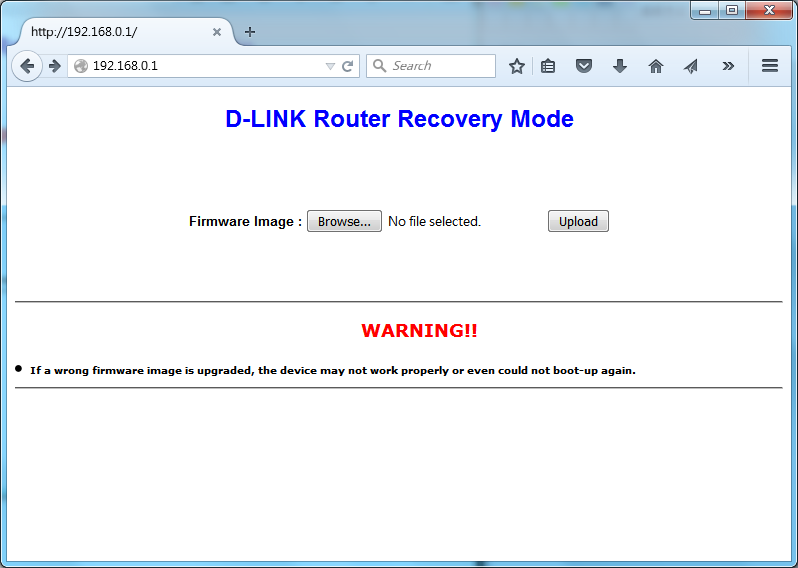


5. 上傳後看到成功的畫面後重開機就成功囉!
(After uploaded, reboot the device will success.)
很~簡~單~吧
( So~ Ea~ Sy~)
2015年8月12日 星期三
Modify git alias (修改alias)
How do I alias commands in git?
http://stackoverflow.com/questions/2553786/how-do-i-alias-commands-in-git
我的 Git 偏好設定
https://ihower.tw/blog/archives/5436
lg = log --color --graph --pretty=format:'%Cred%h%Creset -%C(yellow)%d%Creset %s %Cgreen(%cr) %C(bold blue)<%an>%Creset' --abbrev-commit
[Ubuntu] 修改 bash ,讓 Terminal 不顯示主機名稱

總是覺得 Terminal 的畫面不夠寬嗎? 除了調整字體大小與視窗大小外,還可以透過修改 Bash 來節省空間。
以上圖為例,假使我不希望顯示長長的主機名稱,做法很簡單,只要修改 ~/.bashrc 來達成:
vi ~/.bashrc
找到變數 PS1 後,將 \h 刪除即可,記得重新開 terminal 或執行 bash 才生效。
其它可用的參數:
a : an ASCII bell character (07)
\d : the date in "Weekday Month Date" format (e.g., "Tue May 26")
\D{format} : the format is passed to strftime(3) and the result is inserted into the prompt string; an empty format results in a locale-specific time representation. The braces are required
\e : an ASCII escape character (033)
\h : the hostname up to the first '.'
\H : the hostname
\j : the number of jobs currently managed by the shell
\l : the basename of the shell’s terminal device name
\n : newline
\r : carriage return
\s : the name of the shell, the basename of $0 (the portion following the final slash)
\t : the current time in 24-hour HH:MM:SS format
\T : the current time in 12-hour HH:MM:SS format
\@ : the current time in 12-hour am/pm format
\A : the current time in 24-hour HH:MM format
\u : the username of the current user
\v : the version of bash (e.g., 2.00)
\V : the release of bash, version + patch level (e.g., 2.00.0)
\w : the current working directory, with $HOME abbreviated with a tilde
\W : the basename of the current working directory, with $HOME abbreviated with a tilde
\! : the history number of this command
\# : the command number of this command
\$ : if the effective UID is 0, a #, otherwise a $
\nnn : the character corresponding to the octal number nnn
\\ : a backslash
\[ : begin a sequence of non-printing characters, which could be used to embed a terminal control sequence into the prompt
\] : end a sequence of non-printing characters
參考來源
[1] How to: Change / Setup bash custom prompt (PS1)
http://www.cyberciti.biz/tips/howto-linux-unix-bash-shell-setup-prompt.html
訂閱:
文章 (Atom)